How to Promote Old Songs: Give a Track You Already Released a Second Rollout
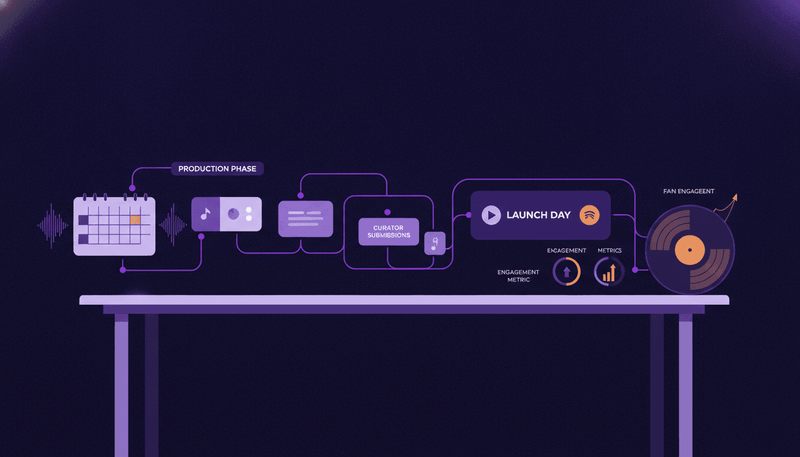
Catalog promotion with a date on it. Pick the track from your own save data, run four weeks of posts, and land it 60 days before your next single.
Pick one song you already released. Give it a four-week rollout of its own. Start that rollout 60 days before your next single. That is how to promote old songs without turning it into a weekly guessing game.
Most advice on this question hands you a pile of ideas: remix it, build a playlist, go live. Here is one process instead. You choose the track with data, you run a fixed list of assets on fixed days, and you judge the whole thing on streams per listener rather than raw streams. A song that is already out gives you something a new single cannot: three months of evidence about who plays it twice.
Step 1: Choose the track from 90 days of your own listening data
Open Spotify for Artists and set the window to the last 90 days. Audience data goes back two years plus the year to date, and it covers unique listeners, streams, streams per listener, saves, playlist adds and followers. Song and release stats cover daily unique listeners and daily streams over the same window.
Now rank every released track by streams divided by unique listeners across those 90 days. Spotify reports daily unique listeners and daily streams for each song, so you work that ratio out per track yourself. Saves and playlist adds sit in the audience stats, for your catalog as a whole, so no save number picks a track for you. Streams per listener does. Raw streams tell you how much a song played. Streams per listener tells you how often the same people came back to it.
Three filters for the shortlist:
- Streams per listener in the top third of your catalog.
- Still picking up new listeners in the last 30 days with nothing pushing it.
- A hook or a line you can talk about for four weeks without getting bored of it.
Pick one track. Not three.
Two details save you a bad reading. Spotify records stats in Coordinated Universal Time and you cannot change the time zone, so count campaign days in UTC or your day-one post lands on the wrong row. And listener demographics and locations only go back 28 days, so write down your top countries before the rollout starts, while the window still covers the quiet period you want to compare against. For a tour of the rest of the dashboard, read our guide on how to read Spotify for Artists stats.
Step 2: Know which doors stay shut, and which stay open
One door closes the moment a song goes live. Spotify is blunt about it: "Once a song has gone live, it's no longer eligible for pitching". No editorial pitch form, and no Release Radar add from a pitch, because that comes from pitching a song at least 7 days before release. Any advice telling you to pitch your two-year-old single to playlist editors is describing something that does not exist.
Three doors stay open.
A video pitch. Song and video pitches run separately, and Spotify tells artists releasing both to pitch each one. You can pitch eligible music videos for consideration in editorial video playlists, and the window is tight: for videos delivered by a label or distributor, the 7 days start from the video's release date. So a new official video for an old song buys you a pitch the song itself cannot have. Video pitching is still rolling out in Spotify for Artists, so check your account before you plan around it.
Discovery Mode, if you are big enough. A song must have been on Spotify for at least 30 days to qualify, and the earliest release date decides it when several versions exist. Every catalog track clears that one, though Spotify also asks for 20 streams in Discovery Mode contexts in the last 28 days, monetization eligibility last month and distribution by one of its listed licensors. The artist team requirements are the hard part: at least 3 eligible songs, at least 25,000 monthly listeners (Spotify says the tool works best at that size or above) and a team registered in one of Spotify's listed countries, plus Discovery Mode is in beta and not open to every artist yet. It costs no upfront budget. Instead a 30% commission applies to recording royalties from streams of the selected songs in Discovery Mode contexts. The calendar matters for your rollout: you set a campaign up between the 11th of the month and 12 AM UTC on the last day of the month, and campaigns start at 12 AM UTC on the 1st of the next month. If you use it, start week 1 on the 1st.
The Canvas. Canvas is an 8-second visual loop that fills the screen in a vertical format, and Spotify's own advice is to keep it updated and change it over time to tell a current story. A catalog track with a 2023 Canvas is the easiest asset on this list to refresh. Choose footage with no talking, singing or rapping, because a 3 to 8 second clip will not sync with your lyrics. Our walkthrough on how to create a Spotify Canvas covers the file specs.
Step 3: The four-week rollout, day by day
Twelve posts, three a week, Monday, Wednesday, Friday. Write the dates in a calendar before you make anything.
Week 1: make the song sound current
Monday: a lyric card with the line people already quote back at you. Wednesday: a short reel built on the strongest 15 or 30 seconds of the song. Friday: why you wrote it, in your own voice, over the cover art. No ask in week 1. You are telling people the song exists again.
Week 2: give it a video
Monday: the new Canvas goes live. Wednesday: a lyric video or a visualizer on YouTube, so the full song has somewhere to live. Friday: a vertical cut from that video. This is the week that unlocks the video pitch from step 2, so keep the upload date and the pitch window in the same seven days.
Music24 makes these from the song you already have. AI reels take the best 15 or 30 seconds of your song over footage that fits its mood, and lyric videos sync your lyrics to your voice with any line fixable in a tap. Videos spend credits from your plan: 1 for a short video, 3 for a full song, and full-song videos and motion artwork come with Pro. Set a date and Music24 lays out every post from the first teaser to six weeks after release, and the plan works on a song that is already out: "Already out? Push an older song with a plan of its own". You can see the whole thing on the plan and post a rollout for an older song page.
Week 3: ask for the save
Monday: ask directly. One line, one plus button, no apology. Wednesday: the second-best moment of the song, the one nobody has heard in a reel. Friday: the link post, pointing at one page with every service on it.
Week 4: hand it to the next release
Monday: post what happened, honestly. Wednesday: connect the old song to the new one you are finishing. Friday: announce the date of the next single. The catalog track has done its job: it warmed the profile the new release will land on.
Connect your channels once and each post goes out at its time, in the right format for each platform. When a platform needs a tap from you, the post arrives ready to share on your phone, so build those taps into your week rather than hoping they do not happen.
Step 4: Start 60 days before your next single
Count backwards from the new single's release date. Day 60 before release: week 1 starts. Day 32: the catalog rollout ends. Day 21: the new single's announce goes out, and the pre-save page opens. That leaves eleven quiet days where the old song keeps running on its own and you build the new campaign.
The reason for the gap is simple. You want the new release landing on a profile that gained listeners, streams and followers in the last month, not on a flat one. Pair this with our plan a music release timeline and our guide to Spotify pre-save campaigns for the last three weeks.
Your plan decides whether the two campaigns can overlap. Bigger plans promote more songs at once, make full-song videos and keep more history. The Artist plan covers what you need to promote 2 songs at once, 20 video credits a month for short videos, AI reels and Canvas, and 90 days of numbers with a daily email and alerts. On Free you publish up to 3 SmartLinks, see 7 days of numbers and promote 1 song at a time, and pushing an old song again starts at Artist, so the catalog rollout needs a paid plan.
Step 5: Judge it on streams per listener
Set the verdict date now: 30 days after week 4 ends. Then check three things.
Streams per listener for the track across the 90 days after the rollout against the 90 days before it. Spotify keeps daily unique listeners and daily streams for every song for two years plus the year to date, so both windows are already sitting there. Saves and playlist adds over the same two windows, read at the audience level, because that is the only level Spotify reports them at. And which posts actually moved it: in Music24 every post sits next to your streams on the day it went out, so you find the reel that worked and make more like it for the next song. Our see which post moved your streams page shows that view.
One more read before you plan the next release. Look at the stores and the countries that play you most, then aim a show, a pitch or an ad where those fans already are: streams and earnings by store and country come from a connected distributor on Artist and up, and country filters and listener data start at Pro.
If streams per listener holds flat and listeners rise, you got reach without repeat plays. Change the asset mix next time, not the track. If both rise, the track earns a third rollout next year.
Running this for a roster
The same four weeks work across a roster if you stagger the start dates by a week per artist, so only one catalog rollout needs your attention at a time. Pick each artist's track from the same streams-per-listener rule rather than from taste, and report it the same way every month. Our run releases for a roster page covers the team setup.
FAQ
How old does a song need to be before it earns a second rollout? Give it 90 days of its own data first, so you have a quiet baseline to compare against. Discovery Mode asks for a song to have been on Spotify for at least 30 days, which makes that a reasonable earliest start if the song never had a rollout at all.
Should I take the song down and re-release it as a new single instead? No. Spotify warns that if a recording or release is redelivered after 90 days, "it will not retain or reflect its previous stream count or private stats". You would trade the listening history that picked this track in the first place for a release date. Promote it where it is.
The track is instrumental. What do I post in week 2? A visualizer carries the full song without lyrics, and the Canvas does the short-form work. Canvas footage is better with no singing in it anyway, since a 3 to 8 second loop will not sync to words. Swap the lyric card in week 1 for a line from the song's story.
Do I need 25,000 monthly listeners for this to work? No. That is Discovery Mode's eligibility bar, not this plan's. Steps 1, 3, 4 and 5 run at any size. Discovery Mode is an optional accelerator in step 2.
What if the second rollout does nothing? Stop after the verdict date, keep the assets, and pick a different track next quarter. Two catalog rollouts a year leave room for your actual releases, which is the point.
Start the rollout this week
Signing up takes an email and no card: "Every new account gets 7 days of the Pro plan, with 15 video credits. No card. You see every asset as a preview with a watermark". That week is enough to pick the track, see all twelve posts laid out on dates and watch the assets get made. The previews carry a watermark, so treat the trial as the dress rehearsal, not the campaign. When the seven days end, nothing gets charged and the account sits on Free, where you promote one song at a time and keep 7 days of numbers. Every plan gets the release kit, the plan, the posting and your numbers. Start free, or compare the limits on pricing first.
Get your music heard. Grow the fans who stay.
Add a song. Music24 makes the posts and the videos, plans your release and publishes it on every channel. Free for 7 days on the Pro plan, no card.